Market tailoring trough localisation

Our team decided to tackle the localisation project from an indie game developer perspective, this means a lack of funds and a need to stand out in a market flooded by indie titles. From a design perspective I thought it would be an interesting challenge to see if we could use the localisation process to better tailor our game to the market while keeping costs in mind as well.

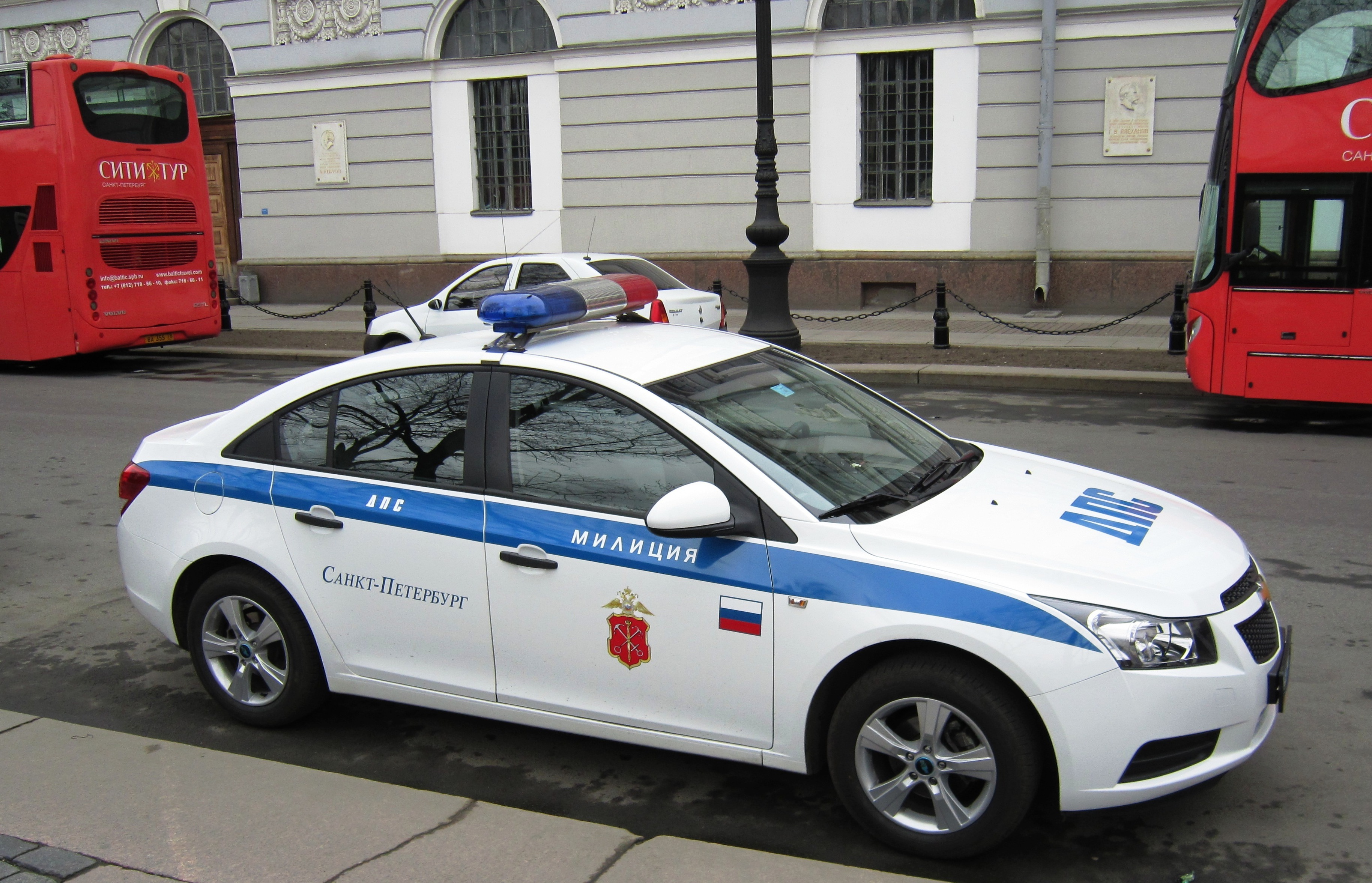
The main protagonist of the game is a police officer who, after crashing his patrol car, finds himself surrounded by zombies. The player assumes the role of the police officer fighting his way trough the zombie hordes. To make our game stand out a bit the decision was taken to have the main character’s uniform and the patrol car reflect the region the player has selected before starting the game.

Research was done on the way police officers dress and the way their patrol cars look in the regions we are localising for.

After the research concluded, all the findings were handed over to our content creator.

Bibliography:

Commons.wikimedia.org, (2015). Police cars by country – Wikimedia Commons. [online] Available at: https://commons.wikimedia.org/wiki/Police_cars_by_country [Accessed 20 Nov. 2015].

Upload.wikimedia.org, (2015). [online] Available at: https://upload.wikimedia.org/wikipedia/commons/b/b7/Russia_police_car_08.JPG [Accessed 20 Nov. 2015].

Hopes&Fears, (2015). Uniforms of Fear: cop fashion from around the world. [online] Available at: http://www.hopesandfears.com/hopes/city/life/214093-police-fashion [Accessed 20 Nov. 2015].

Designdenhaag.eu, (2015). Police uniforms | Design Den Haag. [online] Available at: http://www.designdenhaag.eu/police-uniforms [Accessed 18 Nov. 2015].

Volent, R. and Volent, R. (2015). 20 Police Uniforms from Around the World – Uniform Stories. [online] Uniformstories.com. Available at: http://uniformstories.com/articles/lists-category/20-police-uniforms-from-around-the-world [Accessed 19 Nov. 2015].

– Marius Anton – Design Lead


Language Menu and translations

I finished the language menu, but for some wird reason I couldn’t publish it in GitHub during the weekend.

This is how it started as you can see in the left and with the input of Jay and Anish ended like in the right.

Once the player selects the language we pass to the menu where we get the title translated and the icons that help to minimise the translation needed which helps localisation to be a little bit cheaper.

Menuscene

As for the code needed I started with trying to keep the selected language in a game object that survived every change of scene, but the Anish showed me the PlayersPrefs, and voila! the code became super small and easy. I even got to erase one script that was now obsolete.

Sprites for Translations

We chose to translate:

  • Spain
  • France
  • Germany
  • Italy
  • Russia
  • Poland
  • Portugal

So I ask some friends to help me translateting; For french I asked Amelie my French teacher back in México, she is french, with german Yunus from my Russian Class helped me and for Russian my Russian Teacher help with the translations.

Marius investigated the other languages.

For the game Title Die Next Day

  • Muere Mañana
  • Survivez Un Autre Jour
  • Überlieben Bis Morgen
  • умри завтра

For Game Over:

  • Fin del juego (although, only in Spain the term game over is translated)
  • Jue/Partie Terminée
  • spielende
  • fine dei giochi
  • игра закончена (Igra Zakonchena)
  • Koniec gry
  • fim de jogo

For Day Completed, which is the success message:

  • Sobreviviste el día
  • Journée Terminée
  • Ein Tag Ist Vorbei
  • przeżył  kolejny  dzień
  • sobrevivido  mais  um  dia
  • день закончен (Deen Zakonchen)

I created the sprites needed for the game localisation

Working on Localise Texture

So I have been looking into how I can change the texture of main character “Police” as well as police car in Unity / C#.

I finally managed to change the texture according to the chosen language in main menu.

Screen Shot 2015-12-05 at 6.42.03 p.m.At the moment I’m testing with button all over the main menu :). But this will be changed late on with flags.

Following is a quick demo for localisation of texture.

Tutorial Scene

The main purpose of the tutorial scene is to remove control option from the main menu as well as to teach the player the movement mechanics of the game with minimal text use.

This will help both player as well as indie developer. As indie developer don’t need to translate any text from control panel were as player benefits by familiarising with the controls before playing the game.

As discussed, we are localising DND game into following language.
  • United Kingdom
  • Spain
  • France
  • Germany
  • Italy
  • Russia
  • Poland
  • Portugal

Research shows us that, only Russian keyboard layout is different than default english keyboard. So we will be using standard keyboard layout for all the country except russia.

Tutorial Layout
Quick Demo for the tutorial Scene

Storytelling

As discussed, we wanted to have a story for the game but didn’t wanted it be in a verbal  e.g. in text or in speech. The reason was that, it will only add more task for localisation. As our priority is for indie developer, we wanted to show the other ways of storytelling for the game.  In addition, we wanted to create a story that can be understood just by watching it. So we are creating a short animation within the game to show the beginning of the game without any text or speech.


The animation was done within unity. This is a car crash scene before the game. It has car animation and camera script written to follow the car.

Second Update:

First Update :

Technical To Do List – [Update]

To Do list for the project

1. We need to create animation scene – Scene 1
2. We need create tutorial scene – Scene 2

  • Tutorial scene should do the following things..
  • a. Display Health UI / Gun UI with fade effect
  • b. Display UI controls and it should blink red until user presses it
  • c. For Shoot, Zombie should be present..
  • d. After completion, launch Level 1

3. We need to create main menu – Scene 0

  • It should have play icon, and flags list.
  • -When flag is selected, it should change texture of police and car
  • And should change the Game Over text to that language.
  • Also should change the text under logo to that language.

4. Change the blood of police

5. Maybe change the UI background of Main Menu / Game Over according to flag?

a